Index of my articles on ESP32 Programming and hints how to get things working.
Components for ESP-IDF Development
There are some C++ components for ESP-IDF Development.
An overview can be found at Physical Computing.
Integrated Development Environment
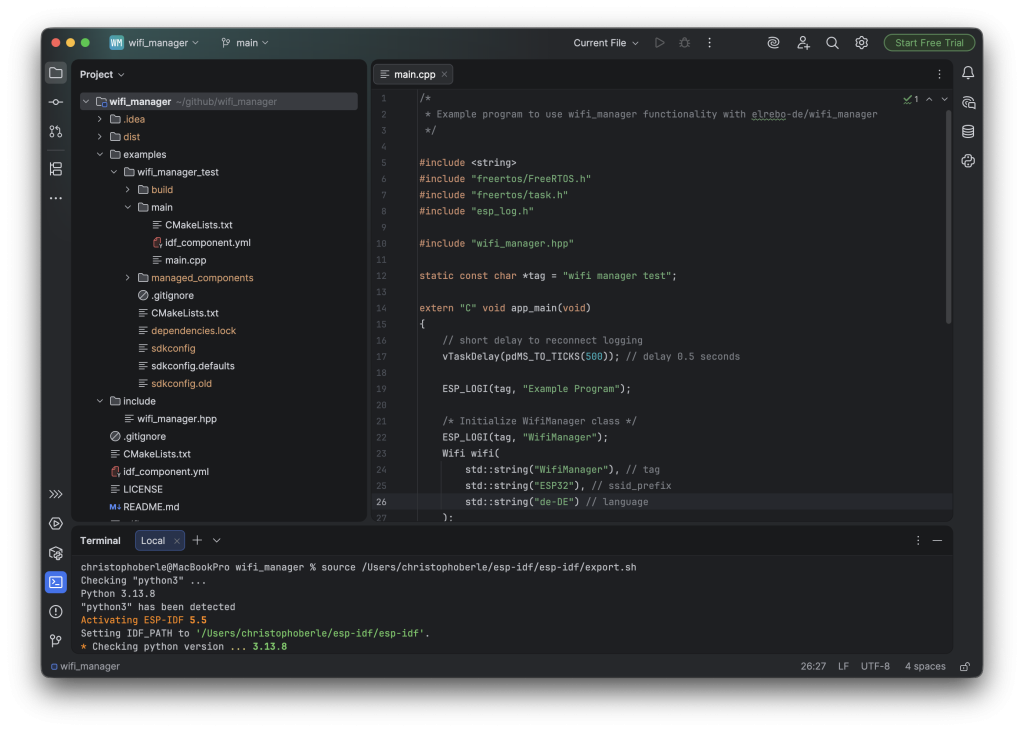
I’m using a simple IDE for the ESP-IDF Development on my MacBook.
First I did the standard toolchain installation as described by Espressif here. This will install the ESP-IDF environment on your computer.
Then I installed the community edition of IntelliJ IDEA.
Building and Deploying a Component
To build and deploy a component to an ESP32 SoC follow these steps in IntelliJ IDEA:
We will walk through the steps with component wifi_manager on an ESP32C3 system.
- Clone the repository of the component on GitHub to your computer:
Open IntelliJ IDEA, click on “Clone Repository” and enter the GiHub URL of wifi_manager: https://github.com/elrebo-de/wifi_manager.git - In the project wifi_manager, which you have cloned, open a terminal.
- In the terminal call the export command of ESP-IDF to make the idf commands available:
source /Users/christophoberle/esp-idf/esp-idf/export.sh
The directory on your computer will be different. It is the location of the esp-idf environment to be used. - Navigate to the example directory:
cd example/wifi_manager_test - Set the target with:
idf.py set-target esp32c3
Now the build files for an ESP32C3 board are created. - Build the program with:
idf.py build
Now the ESP32C3 images are created. - Connect the ESP32C3 board to your computer with a USB cable.
- Flash the program to the ESP32C3 system and run it with:
idf.py flash monitor
Now the program is written onto the device and it is started. The log will be written to the terminal.