An ESP-IDF component for Physical Computing
Purpose
Time synchronization for ESP32 systems.
How it is done
You need to include time_sync.hpp and
provide a function timeTask for the task which synchronizes the time periodically.
After establishing a Wifi connection the TimeSync class must be initialized and
the timeTask must be started.
From then on the time will be synchronized.
Where to find it
time_sync is published on the ESP Registry at https://components.espressif.com/components/elrebo-de/time_sync.
The source code can be found at https://github.com/elrebo-de/time_sync.
How to use it
As an ESP-IDF component time_sync must be included into idf_component.yml as a dependency. As usual this can be done by executing this command:
idf.py add-dependency "elrebo-de/time_sync^1.2.0"
In CMakeLists.txt "elrebo-de__time_sync" has to be added as a requirement.
Now you can include time_sync.hpp and use the TimeSync class in your program.
The TimeSync class is implemented as a Singleton. With this code it is initialized:

Now the timeTask has to be started, which will then synchronize time every SyncIntervalMs milliseconds.

After this code snippet time is synchronized!
The timeTask is implemented like this:
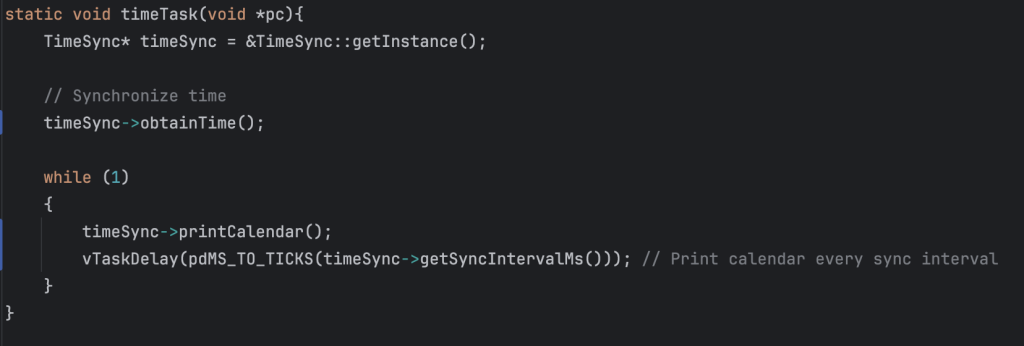
First it gets the pointer to the TimeSync Singleton. Then it uses the methods obtainTime, printCalendar and getSyncIntervalMs to synchronize time every SyncIntervalMs milliseconds.
Leave a Reply