An ESP-IDF component for Physical Computing
Purpose
Functionality to use the onboard LED of ESP32 systems.
How it is done
ESP32 boards normally have an OnBoard LED.
Depending on the board this can be a normal LED (e.g. a blue one) or an LED strip, where the color and intensity can be set.
Class OnBoardLed has two constructors,
- one for LED type “GPIO” (the normal LED) and
- one for LED type “LED strip”
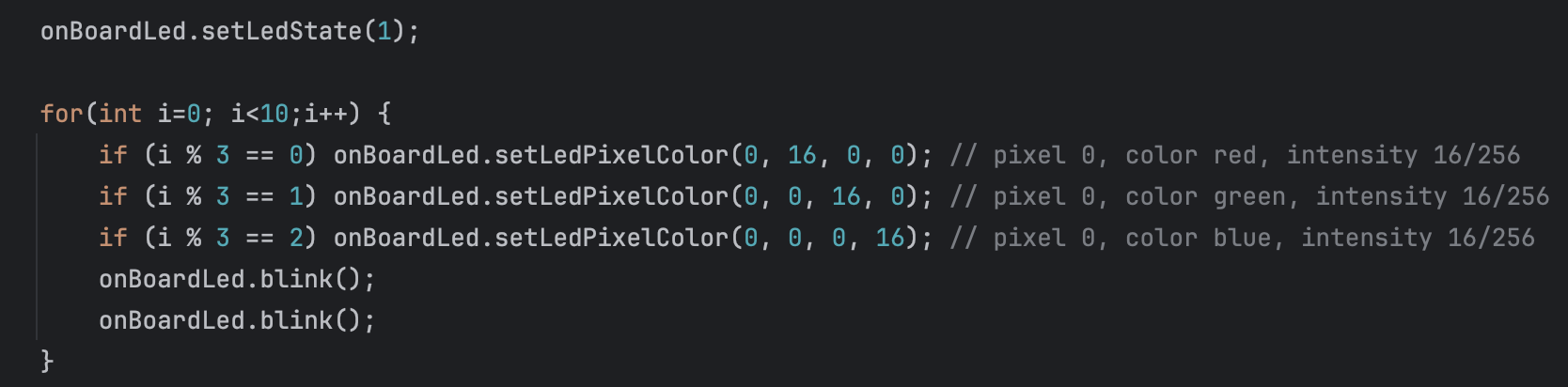
The color and intensity of an LED of type “LED strip” can be set with method setLedPixelColor.
The LED state (on/off) can be set with method setLedState and retrieved with method getLedState.
After setting color, intensity and state the data is transferred to the LED with method show.
Method blink can be used to let the LED blink.
Where to find it
onboard_led is published on the ESP Registry at https://components.espressif.com/components/elrebo-de/onboard_led.
The source code can be found at https://github.com/elrebo-de/onboard_led.
How to use it
As an ESP-IDF component onboard_led must be included into idf_component.yml as a dependency. As usual this can be done by executing this command:
idf.py add-dependency "elrebo-de/onboard_led^1.0.6"
In CMakeLists.txt "elrebo-de__onboard_led" has to be added as a requirement.
Now you can include onboard_led.hpp and use the OnBoardLed class in your program.
Leave a Reply to Physical Computing – elrebo Cancel reply